Showing posts with label Trick. Show all posts

Saturday, 4 April 2015

Free Calling Android App Without Internet Connection 2015

free-calling-android-app-latest-working
Hullo Free Calling Android App
Namaste! :) In this post I am gonna share an awesome android app to call anywhere, anytime for free without Internet Connection. Yes! you heard right now you can call anywhere without paying a single penny even without internet connection. :) Nowadays everyone wants a solution to reduce calling bills. So after reading this post you won't need to waste your hard earned money on calling bills. This is just a simple app that offers free calls worldwide without internet connection. So by using this android app you can call to anyone without internet for free. 
This app is called Hullo. Hullo is an android app that gives you freedom of calling anywhere, anytime for free.  So lets start without wasting priceless time.

What is Hullo ?

  • Hullo is your awesome new free calling app that doesn't need Internet data. 
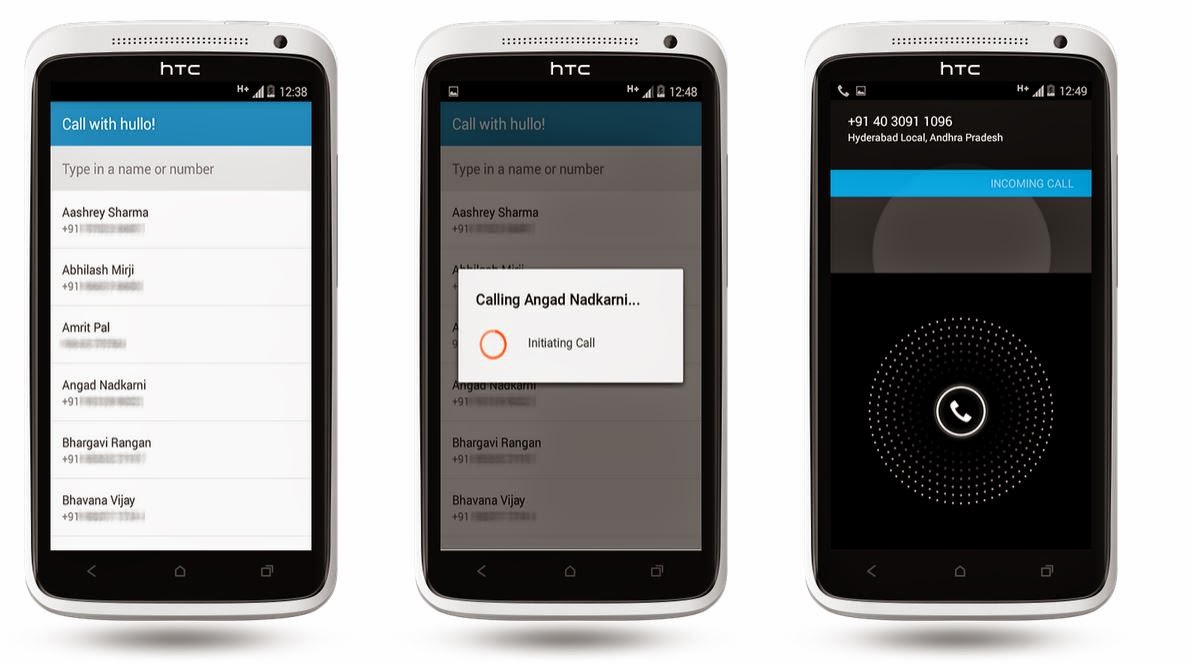
free_calling_app_free_unlimited_calls_anytime_without_internet
Free Call Without Internet Data

Features of Hullo Free-Calling App - 


  • Hullo is free android app
  • Easy to use
  • No Internet data required
  • Free calling anywhere, anytime 
  • Small in size


How to use Hullo free-calling Android app ? 

  1. Download Hullo app from given link 
  2. Install Hullo free-calling app
  3. Connect with Facebook 
  4. Tap on a contact to call them for free. :)

Now you need not to worry about phone bills. No more worrying about balance. No more missed calls. No limits on talk time or number of calls made. Use Hullo free-calling app and enjoy unlimited free calls from your android device/smartphone even without wasting your internet data. :)

Download Hullo Free-Calling Android App For Free - 


Hullo Free Calling App


Latest Post - Hack Wi-Fi Password In Android Phone

Frequently asked question about Hullo free-calling app -
 

Q. Do I need internet to make the call?
A. Only to request the call. You do not require your internet data for the call.
 
Q. I just got a message saying you are offline
A. That is because the friend who tried to call you did not have mobile internet switched on while calling you.

Q. Does my friend need internet to recieve a call?
A. No they do not, as the phone calls are not over the internet.

Q. Where do I report issues?
A. You can message us on hullo@gethullo.com or on our facebook page.

Q. Are SMS’s free too?
A. No, only calls are free.

Q. What if I am on windows or iOS?
A. The hullo app for Windows and iOS are to be released shortly.

Q. Is this anywhere in the world?
A. As of now this is just for calls in India.


If you liked this post please share it with your friends on Facebook and other social sites because 'Sharing is Caring' :) 

Keep visiting for more such tricks and tutorials. 

If you have any query or questions regarding this post, don't hesitate to ask in comments below. 

Share+Like+Comments - Thank You!

Paytm Loot - Give Missed Call & Get Rs. 15 Paytm Cash [Latest]

paytm-loot-give-missed-call-and-get-rs-15-paytm-cash

Loot-Give Missed Call & Get Rs. 15 Paytm Cash


Paytm Wallet Offer - Paytm is heading towards heights for becoming the best online recharge site and online shopping site with its offers and discount rated deals. Paytm is known for Online recharge of Mobile, DTH and Datacard and moreover you can make bill payments and recharge online for Airtel, Vodafone, Aircel, Idea, Docomo, BSNL, MTNL and more. Online Shopping has seen an exponential growth in the recent years. Realizing the benefits of it, Paytm has entered the world of online shopping with top brands across all verticals. You can literally buy anything in the wonderland of Paytm. There was a time when we used to go to a retail store to buy a particular product available with limited options. Breaking this barrier, Paytm can be used anytime anywhere within the comfort of your home or office.


In this post I am sharing an amazing promotional offer by Paytm for there new users. New users will get free Rs 15 to there Paytm wallet cash just by giving a missed call to a number. So you don't required any Paytm coupons or Paytm promo code for this. All you need to do is a free call to get free Paytm wallet balance.

Steps To Get Free Paytm Wallet Cash-

  • Give a missed call to this number -


    01204956301

Note: You will not be charged anything for this, the call will disconnect on ringing automatically.
 

  • Let the phone disconnect automatically.
  • After call gets disconnected you will get a text message from Paytm for confirmation of free Rs. 15 wallet cash.

Terms & Conditions:
1. Clicking on the above button you are agreeing for creation of your Paytm semi-closed wallet. Read T&C before clicking.
2. This offer is only for new Paytm Users.
3. Rs.15/- will be credited as Paytm Cash in your wallet once you set the password for your account through the sms you receive after the call.
4. Paytm cash can be used for Mobile Recharge/ DTH/ Shopping, yay!

If you liked this post please be kind and share it with your friends on Facebook and other social sites because 'Sharing is Caring' :)


If you have any problem/issue regarding this post don't hesitate to ask in comments below. 


Share+Comments+Like-Thank You! :)

Saturday, 21 March 2015

Approve Google Adsense In A Minute After Disapproved/Rejected [Full Tutorial] [Latest]

AdSense Disapproved/Rejected Fix
Namaste! :) In this post I am back again with the solution of a very common issue 'AdSense Disapproved/Rejected'. It is as 'Google have any personal problem with me, it always disapproves my application'. ;) But it's not like that, Google AdSense only approve those blogs or website which compile with their terms and conditions. But if your blog or website disapproved for AdSense, then this post is for you and its very helpful. 
As I also faced the same problem and I was tired because every time I apply for AdSense, only one email from Google AdSense 'Unfortunately after reviewing your blog/website we are enable to approve your application at this time' :( Isn't it ridicules ? Yes it is. But after so many attempts I got success, finally Google AdSense Approved on my blog/website.
And now I can show ads on my blog without any further issue. And it's ultimate and very simple trick to get Approved for Google AdSense. You can also find many posts and articles on web about 'How to get fully Approved Google AdSense'. But most of them are useless and some are very difficult. 
But after read this post you won't need to find another solution for this issue, because it's confirmed working and tested by me. And by this method you will definitely get Fully Approved AdSense Account for your blog/website. 
So lets start and follow the below steps accurately, if you want to Approve Google AdSense on your blog/website:

Steps to be followed - 
Step 1. First of all create a YouTube Channel and upload some unique videos. [Don't upload someone's else video]
Step 2. Now after that enable Monetization on your YouTube videos. To do so go to My channel > Videos Manager > Channel > Monetization and enable Monetization.
adsense_approval_trick_confirmed_working_2015
google_adsense_disapproved_fix
Enable Monetization on YouTube Channel
 Step 3. Now YouTube will ask you to associate an AdSense account with your YouTube Channel to get revenue. 
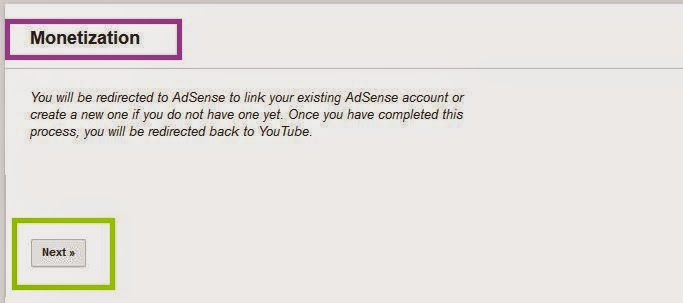
Step 4. Then associate AdSense account by following screen instructions. [Go to > Here! and click Next ]
enable_monetization_on_youtube_channel
Associate AdSense Account With YouTube Channel

Step 5. Now after that you will get an email from Google AdSense that 'Your AdSense account is approved to show ads on your YouTube videos' 

Step 6. Now go to your AdSense account make sure that it's fully activated.

Step 7. Then go to your blog dashboard on which you want to apply AdSense and navigate to Settings > Basic > Permissions > Blog Authors, here click on +Add authors and enter that Gmail id on which you got approved AdSense for YouTube and click Invite.


adsense_approve_on_your_blog/website_within_a_minute
Add New Author


Step 8. Then open your AdSense approved email id and you will find an email of invitation to contribute for blog, open it and accept invitation.

Step 9. Now go to you Blog dashboard > Earnings > Switch account and use your approved email id and click on Continue.


google_adsense_account_approval_trick_working
Switch AdSense Account
Step 10. That's it you will see a message that 'Congratulation! The AdSense widget has been added to your blog template.' Now click on Continue and setup ads on your blog/website. :)


adsense_approved_on_blog/website_in_a_minute
AdSense Approved 
Now you can show ads on your blog/website without any issue. And by using this method you need not to wait a long to get reply from AdSense. So guys I hope you enjoyed this tutorial. :) 
I also created a video of this, by which you can better understand the steps. So watch the full video and enjoy your fully Approved Google AdSense Account :) 

How To Approve Google AdSense On Blog In A Minute [Working]


So if you liked this post, please share this post with your friends on Facebook and other social sites because 'Sharing is Caring' :)


If you have any query or questions regarding this post, then don't hesitate to ask in comments below. We will reply ASAP. :) 


Share+Like+Comments - Thank You! ;)

Monday, 9 March 2015

Easy Way To Find Who Deleted/Unfriend You On Facebook ?

how_to_find_who_deleted_unfriended_you_on_facebook
How To Find Who Deleted / Un-frinended You On Facebook -

Is this possible to find who deleted you on facebook?? The answer will be yes. You can track who un-friended you on facebook. I maintain an active facebook profile more than 1000 friends in my facebook list and i dont even know 75% of them but its all about networking. Social media website is the best tool for promote your site and gets lots of traffic through them. Social networking site is all about networking and engagement. Lets come at the topic how to track who deleted you on facebook.


Who.Deleted.Me is useful service provides you to find new added friends and who deleted you on facebook. This is the webapp and i am using it for some time. This app is easy to use and all you need to do login with your facebook account.


  •     Now go on who.deleted.me website.
easy_way_to_find_who_unfriended_you_on_facebook


  •     Now simply login with your facebook account. It Will shows you your new added friends and those who unfriended you on facebook.
  •     This is totally free service provided by who.deleted.me web app.
  •     Thats it enjoy.

If you like this post, please share it on Facebook, Twitter etc.


Keep visiting for more Tutorials :)

Friday, 13 February 2015

Free Calling Trick For All Operator SIM 2015

make_free_calls_anywhere_anytime_full_tutorial

Free Calling Trick For All Network SIM - 


Today we have a great trick of free calling for any operator. This trick is only for Indian users. Yes its possible to call anyone with zero balance. This trick will work with all Indian operators. This trick will help you in emergency situation. :P

How to make free call ?


1. Give a missed call to 180020802080

2. Within 1 minute you will recive a call on your mobile

3. Speak with suitable answers (Tell Your name, Tell the mobile number that you want to call)

4. You will be connected to the required number for free call

5. Enjoy Free calling on your mobile phone.

 
Note - You have only 2 minutes for free call with one SIM card but dont worry after 15 days you can do this again. It will be very useful in emergency situation.

Share this post with your friend on social sites 'Sharing is Caring' :)

Keep visiting to know more such tricks. ;)