
 |
| Download Full Backup Of Blogger Blog Posts |
Namaste :) In this post I'll explain How you can download full backup of your blogger blog. Nowadays every newbie have their own blog. The main purpose to create a blog on blogger.com is to make money with Google AdSense. Because Google AdSense is best choice to show genuine ads on your blogger and make money with it. Read this post 'Approve AdSense In A Minute On Your Blog' to successfully get approved by Google AdSense in very first attempt. Come on the topic, Backup is very important because sometimes your blogger blog gets deleted. May be it's because your blog is avoiding TOS of Blogger or may be you deleted it by mistake. So in case you loose your all posts of blogger blog. But if you have backup of your blogger blog then you need not to worry you can easily get your all valuable posts. Just upload that backup and you are done!
So lets start, follow the below mentioned steps accurately to download full backup of your blogger blog -
How to download full backup of blogger blog ?
Step 1. First of all login to your blogger dashboard and choose the blog which you want to take backup of.
Step 2. Then go to > Settings > Other Here is an option 'Blog Tools'
Step 3. Click on 'Export blog' and then a pop-up will open.
 |
| Click on Export blog |
Step 4. Now click on 'Download Blog' and backup of your blog will start downloading.
 |
| Download Blog |
That's it! Now you have full backup of your blogger blog to use in bad situation. To use that backup you have to upload that backup file to the new blog. To do so follow the below instructions.
How to upload full backup of your blogger blog to another blog ?
Step 1. Sign in to your blogger blog and open dashboard of your new blog.
Step 2. Now go to Settings > Other > Blog Tools
Step 3. Now here you will see three options Import blog - Export blog - Delete blog.
Step 4. You have to choose 'Import blog' option and a pop-up box will open.
 |
| Import Blog |
Step 5. Now choose your backup file by clicking on 'Browse' button.
Step 6. Then click on 'Import Blog' button to start uploading your blog backup.
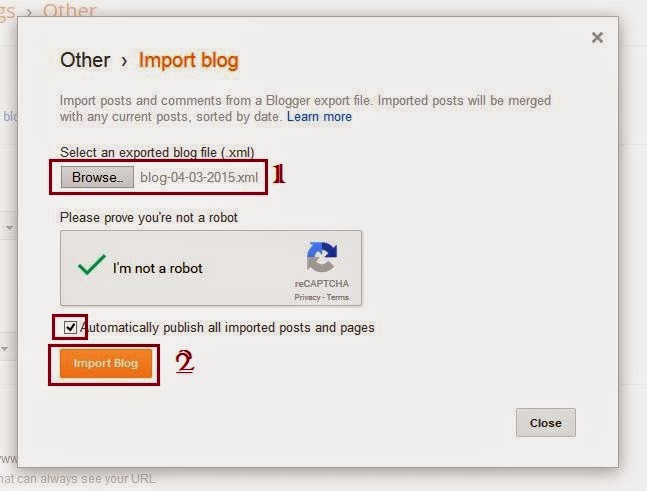 |
| Upload Blog |
You have done! Now wait a few minutes till backup file successfully uploaded. After that your all posts of old blog will be published automatically on your new blogger blog. :)
So enjoy your new blog with all your old posts and pages. :)
How to backup all posts and pages of Blogger Blog Full Tutorial
If you liked this post then please share it with your friends on Facebook and other social sites because 'Sharing is Caring' :)
Keep visiting for more such tutorials and tricks. ;)
Have any query or questions regarding this post ? Don't hesitate to ask in comments below.
Share+Like+Comment - Thank You! :)

.jpg)


.png "Fileice Survey bypass trick latest 2015")






.png "Airtel 3G Trick UDP With Unlimited Downloading")

